Introduction
Revenue and enablement leaders share a familiar frustration: their LMS, CRM (Salesforce), and virtual training tool (Zoom) don't talk to each other. Training completion data sits in the LMS. Deal velocity and pipeline metrics live in Salesforce. Zoom session attendance gets logged manually, or skipped entirely. That fragmentation creates data gaps, doubles administrative work, and makes it nearly impossible to connect training to revenue outcomes.
When an LMS integrates natively with both Salesforce and Zoom, the picture changes. Organizations can automate enrollments based on CRM data, deliver live virtual training without platform-switching, and tie learning outcomes directly to pipeline metrics. This guide covers the top five platforms with true dual-integration capability and what to look for when choosing between them.
Key Takeaways
- An LMS with both Salesforce and Zoom integrations keeps training data, CRM records, and live sessions in one connected workflow, no manual handoffs
- Salesforce integration enables automated enrollments, CRM-linked reporting, and training-to-revenue tracking
- Zoom integration schedules sessions, logs attendance, and delivers recordings without leaving the LMS
- Top platforms for this use case: Pifini, MapleLMS, Docebo, LearnUpon, WorkRamp, and Absorb LMS
- When evaluating options, native integrations outperform third-party connectors, and the best platforms tie certifications directly to pipeline metrics
Why Your LMS Needs Both Salesforce and Zoom Integrations
What Each Integration Does Independently
Salesforce integration syncs user data, automates course enrollment based on CRM roles or deal stages, and displays training completion directly in CRM dashboards. Zoom integration lets admins schedule instructor-led sessions, push join links to learners, auto-mark attendance, and store recordings in the LMS library.
Why Having BOTH Matters
When a rep misses a live Zoom training session, the LMS can flag it in Salesforce and trigger re-enrollment automatically. When a learner completes a certification, that data updates their Salesforce record and feeds into pipeline reporting. This creates a closed loop between learning and revenue performance. Sales managers can see exactly which training drives quota attainment, and which partners need intervention.
Market Reality
The numbers make the case clearly:
- The LMS market is projected to reach $88.41 billion by 2032
- Virtual instructor-led training (VILT) now accounts for 24% of all training hours delivered
- Sales reps already juggle an average of 8 tools to close deals, with 42% reporting tool sprawl as a daily friction point
- That overwhelm correlates directly with a 45% drop in quota attainment
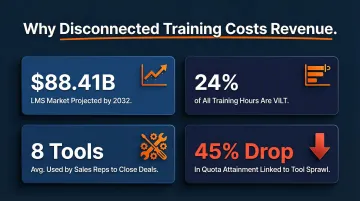
When training lives outside the tools reps already use, it gets skipped. Embedding your LMS into Salesforce and Zoom workflows removes that friction, and keeps learning connected to the deals that depend on it.
Top LMS Platforms with Salesforce and Zoom Integrations
Each platform below was evaluated across four criteria:
- Depth of Salesforce and Zoom integrations
- Use case fit for sales and partner training
- AI capabilities
- Scalability for extended enterprise audiences
MapleLMS
MapleLMS is a Salesforce-native LMS ranked highly on the Salesforce AppExchange, purpose-built to run inside Sales Cloud, Service Cloud, and Experience Cloud. For organizations where Salesforce is the operating system of their business, MapleLMS delivers training without requiring learners to leave the CRM environment.
Key Differentiators:
- Learners access courses directly inside Salesforce
- Real-time training-impact reporting tied to sales metrics
- AI-powered content recommendations based on Salesforce object data (deal stage, role, product line)
- Zoom sessions scheduled and tracked within the LMS workflow
| Category | Details |
|---|---|
| Salesforce Integration | Native, bi-directional sync; accessible inside Sales Cloud, Service Cloud, and Experience Cloud; Salesforce-object-triggered course recommendations |
| Zoom Integration | Supports Zoom-hosted VILT; attendance tracking and recording storage managed from the LMS |
| Best For | Organizations running sales and partner operations inside Salesforce who need training data visible in CRM dashboards |
| Pricing | Custom pricing; contact MapleLMS directly |
Docebo
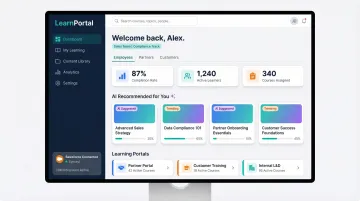
Docebo is an enterprise LMS platform serving internal employees, customers, and partners from a single instance. The platform offers confirmed integrations to both Salesforce and Zoom as part of its broader tech stack connectivity.
Key Differentiators:
- AI-powered content curation and tagging surfaces relevant training automatically
- Modular add-ons expand functionality
- Custom-branded learning portals for different audiences (internal reps vs. channel partners)
- Salesforce sync enables learning data to update CRM records and vice versa
| Category | Details |
|---|---|
| Salesforce Integration | Bi-directional data sync; learning completions and certifications reflected in Salesforce records; supports automated enrollment triggers |
| Zoom Integration | Native Zoom connector for scheduling and hosting live sessions; attendance auto-logged; recordings accessible within learner's LMS profile |
| Best For | Mid-to-large enterprises training multiple external and internal audiences who need branded, scalable delivery and AI-driven personalization |
| Pricing | Custom pricing; Salesforce integration is a paid add-on |
LearnUpon
LearnUpon is a multi-audience LMS designed for organizations that need to train employees, partners, and customers from a single platform. It features a clean administrative interface and confirmed Salesforce and Zoom integrations.
Key Differentiators:
- Multi-portal setup allows separate learning environments for different audiences managed from one admin
- Straightforward Salesforce connector syncs enrollments and completions
- Zoom integration streamlines VILT scheduling directly from the LMS
- Fast to implement with minimal admin overhead
| Category | Details |
|---|---|
| Salesforce Integration | Enrollment automation and completion sync with Salesforce; learner data flows between platforms without manual exports |
| Zoom Integration | Zoom VILT scheduling, automatic join-link distribution to enrolled learners, and attendance tracking natively managed in LMS |
| Best For | Organizations delivering structured training to employees, partners, and customers simultaneously who want a clean, low-friction admin experience |
| Pricing | Plans start from 300 users; contact for custom pricing |
WorkRamp
WorkRamp is an LMS built for B2B tech companies and sales organizations, with AI-assisted course creation built into its core workflow. Its Salesforce integration is designed to tie learning progress directly to revenue performance metrics like quota attainment and pipeline contribution.
Key Differentiators:
- Separate Employee Learning Cloud and Customer Learning Cloud allow distinct training tracks
- AI-assisted course creation and blended learning capabilities
- Salesforce integration surfaces training completion alongside CRM pipeline data
- Zoom integration supports Zoom Meetings (not Webinars)
| Category | Details |
|---|---|
| Salesforce Integration | Deep Salesforce connector links training completions to sales performance data; admins can view learning progress alongside CRM pipeline metrics |
| Zoom Integration | Admins add Zoom links directly to Event sessions; supports Zoom Meetings only |
| Best For | B2B tech companies and sales teams that want to connect rep training directly to quota attainment and customer retention outcomes |
| Pricing | Contact sales for Professional and Enterprise plan pricing |
Absorb LMS
Absorb LMS is a mid-enterprise platform focused on delivering internal employee training efficiently, with confirmed integrations to both Salesforce and Zoom. The platform is recognized for fast implementation and intuitive UX.
Key Differentiators:
- Smart scheduling and automated enrollment reduce admin burden
- Built-in reporting and custom dashboards give managers visibility into training progress
- Salesforce and Zoom integrations work without heavy configuration
- Strong fit for companies wanting reliable, low-maintenance training infrastructure
| Category | Details |
|---|---|
| Salesforce Integration | Salesforce connector syncs learner data and training completions with CRM records; supports automated enrollment based on CRM data (requires purchase) |
| Zoom Integration | Zoom integration enables live session scheduling and attendance tracking directly within the LMS admin interface |
| Best For | Mid-sized organizations needing a reliable, low-overhead LMS with solid Salesforce and Zoom connectivity for internal training programs |
| Pricing | Custom pricing based on number of learners |
Pifini
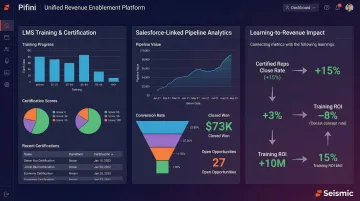
Pifini is an AI-powered revenue enablement platform that includes an enterprise LMS, built on the NetExam foundation, alongside Digital Sales Rooms, AI sales coaching, live call copilot, and partner enablement tools. It connects with Salesforce and 100+ other integrations, making it a fit for organizations that need training tied directly to revenue outcomes rather than standalone course completion.
Key Differentiators:
- Prescriptive learning auto-enrolls users into targeted training when performance gaps appear
- Training impact analysis links certifications and learning scores to pipeline growth and win rates
- Salesforce integration surfaces learning data inside CRM without switching tools
- Zoom and video conferencing integrations supported across live training workflows
- Priced at $50/user/year, a fraction of comparable enterprise platforms
| Category | Details |
|---|---|
| Salesforce Integration | Bi-directional sync connects training completions, certifications, and readiness scores to CRM records and pipeline data |
| Zoom Integration | Supports live session scheduling and attendance tracking within the LMS workflow |
| Best For | Sales teams, channel partners, resellers, and distributors that need training, coaching, and revenue analytics unified in one platform |
| Pricing | $50/user/year; unified platform with no add-on fees |
How We Chose the Best LMS Platforms with Salesforce and Zoom Integrations
Platforms were evaluated across five criteria:
- Salesforce integration depth, native AppExchange app vs. third-party connector vs. Zapier workaround
- Zoom integration quality, native scheduling and attendance tracking vs. manual link-sharing
- Scalability for partner and sales team training
- AI capabilities built into the platform
- Pricing transparency with no hidden add-on costs
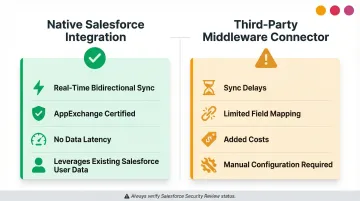
The most common mistake buyers make is treating any Salesforce or Zoom integration as equal without checking whether it is bidirectional, real-time, or requires a paid add-on. Native Salesforce applications built entirely on the Force.com platform eliminate data latency and leverage existing user data, while middleware connectors like Zapier introduce sync delays and limited data fields.
For revenue and partner-focused teams, the key outcome to evaluate is whether the LMS can surface training completion data inside Salesforce dashboards, so training ROI can be tied to actual deals closed, certifications earned, and partner performance.
Teams that need all of this in one place, enterprise LMS, Salesforce connectivity, AI coaching, and prescriptive learning paths, should explore Pifini. It's an all-in-one revenue enablement platform priced at $50/user/year, built to link training completion directly to pipeline and win rates.
Conclusion
Choosing an LMS for Salesforce and Zoom integration is not just a technical decision, it's a revenue strategy decision. The right platform ensures training data flows into the same system your sales managers review every day, so rep progress, certification gaps, and coaching needs are visible where deals actually get managed.
Evaluate not just whether a platform technically integrates, but whether the integration is deep enough to automate workflows, reduce admin overhead, and produce reporting that ties learning to business outcomes like win rate, partner revenue, and customer retention.
For teams managing channel partners, resellers, or distributed sales forces, bolt-on integrations rarely hold up at scale. Platforms like Pifini are built specifically for this motion, unifying LMS, AI coaching, and CRM-linked analytics into a single system rather than patching together separate tools. If revenue enablement is the goal, that's where the evaluation should start.
Frequently Asked Questions
What are the top 5 LMS systems?
The best LMS depends on your use case. For organizations prioritizing Salesforce and Zoom integrations, MapleLMS, Docebo, LearnUpon, WorkRamp, and Absorb LMS are strong contenders. MapleLMS offers native Salesforce deployment, while Docebo and LearnUpon excel at multi-audience training with robust integration ecosystems.
What are the four types of learning management systems?
The four common LMS types are cloud-based (SaaS), self-hosted (on-premise), open-source, and native/embedded. Cloud-based platforms offer fast setup and predictable subscription costs. Native LMS apps, like Salesforce-native solutions, share the host platform's database and UI, eliminating integration complexity entirely.
Does Salesforce have a built-in LMS?
Salesforce is a CRM, not an LMS. Several platforms are built natively on Salesforce, like MapleLMS via AppExchange, or integrate deeply enough to run training inside the Salesforce environment. Salesforce does offer Trailhead, but that's for learning Salesforce itself, not a white-labeled enterprise LMS.
What does Zoom integration actually do inside an LMS?
Zoom-LMS integration lets admins schedule live sessions, auto-distribute join links, mark attendance, and store recordings in each learner's profile, without leaving the LMS. This eliminates manual data entry and keeps training records complete and accurate.
Can an LMS integrate with both Salesforce and Zoom simultaneously?
Yes. Several platforms support both integrations concurrently, allowing organizations to manage live virtual training (Zoom) and tie all training outcomes to CRM data (Salesforce) from a single system. Confirm both integrations are native or certified, middleware workarounds introduce sync delays that undermine data reliability.
How do I know if a Salesforce LMS integration is native or third-party?
Native integrations are built directly on Salesforce, listed on AppExchange, and offer real-time bidirectional data sync. Third-party connectors via Zapier or middleware often introduce sync delays, limited field mapping, and added costs. Verify the integration passed Salesforce Security Review as a baseline check.