Introduction
Most training programs were built for rooms, shared space, shared schedules, a trainer at the front. Remote teams broke that model entirely.
Geography, time zones, and the absence of in-person oversight create challenges traditional classroom learning never had to solve. Whether you're managing distributed sales reps, channel partners across multiple continents, or deskless employees on rotating shifts, engagement and retention drop sharply when learners can't be in the same place at the same time. Static content libraries and one-size-fits-all LMS platforms haven't filled that gap.
AI tools are closing this gap by enabling L&D teams to create training content faster, personalize learning for asynchronous delivery, and track whether it's actually driving results, all without needing large budgets or dedicated production teams. According to Synthesia's 2026 AI in Learning & Development Report, 87% of L&D teams are already using AI, with 61% leveraging it specifically for content creation. The corporate e-learning market is projected to grow by $131.01 billion between 2024 and 2029, driven by organizations actively replacing legacy training approaches with tools built for distributed workforces.
Key Takeaways
- AI tools let L&D teams build professional training content in hours, not weeks, without needing dedicated designers, videographers, or instructional design staff
- Remote training demands async-first delivery, mobile accessibility, multilingual support, and tools that sustain engagement without a physical classroom
- The 5 tools covered: Pifini.ai (LMS + AI coaching), Synthesia (AI video), EdApp (mobile microlearning), Coursebox (AI course authoring), and ChatGPT (AI content generation)
- Selection criteria: remote-readiness, content creation speed, ease of use, integration with delivery platforms, and measurable completion and performance outcomes
Why Remote Worker Training Demands a Different Approach
Remote worker training isn't just office training delivered over Zoom. The structural constraints are fundamentally different: no live supervision, no whiteboard sessions, variable internet access, and asynchronous schedules mean content must be self-guided, bite-sized, and engaging without a facilitator present.
The challenge compounds for organizations with channel partners or distributed sales teams. Training must happen across different companies, geographies, and time zones, with no guaranteed infrastructure on the learner's end. A sales rep in Southeast Asia can't wait for a session scheduled in Mountain Time, and a field technician in rural Australia may not have reliable connectivity for streaming video.
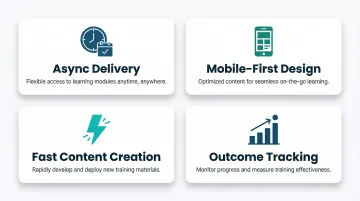
That context shapes every recommendation below. The tools here were selected with these constraints in mind, prioritizing:
- Async delivery, content learners can access on their own schedule
- Mobile-first design, functional on a phone, not just a desktop
- Fast content creation, so training keeps pace with product and process changes
- Outcome tracking, proof that training is actually translating to performance
5 Best AI Tools for Creating Training Content for Remote Workers
Each tool below was selected based on how well it handles the real constraints of remote training: async delivery, multilingual teams, limited L&D staff, and the need to connect learning to measurable outcomes.
Pifini.ai
Pifini.ai is an AI-powered revenue enablement and learning platform built specifically for remote sales teams, channel partners, resellers, and distributors, not just internal employees. Built on the replatformed NetExam LMS, it's an all-in-one platform combining content creation, delivery, AI coaching, and performance analytics.
What sets it apart for remote training is prescriptive AI that auto-enrolls learners when performance gaps are detected. Built-in microlearning, gamification, and roleplay simulations all run asynchronously, plus live AI coaching fires during actual sales calls.
It's the only tool on this list that directly connects training completion to revenue metrics: deal win rates, certifications, and pipeline growth. Partners who complete certification programs generate 6x more revenue than untrained partners, making this connection critical for sales-focused training.
| Attribute | Details |
|---|---|
| Best For | Remote sales teams, channel partners, resellers, and distributors needing training tied to revenue performance |
| Key Features | Prescriptive LMS, AI roleplay/call coaching, microlearning, gamification, partner-first design, certifications |
| Pricing | $50/user/year (all-in-one; no add-ons or hidden costs) |
Synthesia
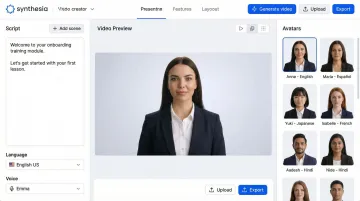
Synthesia is an AI video creation platform that turns a text script into a professional training video, no cameras, studios, actors, or editing skills required. Global L&D teams use it for onboarding, compliance, and product training.
For remote teams, the advantages are practical: AI avatars deliver consistent messaging across locations, videos translate into 100+ languages without re-recording, and content updates take minutes instead of new production shoots. Research shows narrated videos improve learning performance with a median effect size of 0.76 compared to printed text, a meaningful edge for distributed workforces.
| Attribute | Details |
|---|---|
| Best For | Creating async video training content for multilingual, globally distributed teams |
| Key Features | AI avatars, script-to-video, 100+ language translation, PowerPoint import, screen recording |
| Pricing | Free: $0/month (10 min video, 9 avatars); Starter: $18/month annual ($29 monthly); Creator: $64/month annual ($89 monthly); Enterprise: Custom |
EdApp (by SafetyCulture)
Important Update: SafetyCulture is officially shutting down EdApp (SC Training) on March 31, 2026, requiring all users to migrate their data. Organizations evaluating EdApp should plan for this transition.
EdApp is a mobile-first microlearning platform designed for frontline and remote workers who need training that fits into short windows during their workday, not hour-long desktop sessions. It offers AI content generation alongside 1,000+ editable course templates.
The platform was built around remote constraints from the start: lessons run in bite-sized formats on smartphones, offline mode keeps learning going even with poor connectivity, and gamification sustains completion rates without a facilitator pushing participation. Before the shutdown announcement, EdApp delivered over 77,000 lessons daily to more than 1 million users across 70,000+ organizations.
| Attribute | Details |
|---|---|
| Best For | Mobile, deskless, and field-based remote workers who need short, offline-accessible lessons |
| Key Features | AI course generation, mobile-first microlearning, gamification, offline mode, 1,000+ editable templates |
| Pricing | Free: Up to 10 learners; Premium: $5/learner/month (annual billing, minimum 1 admin at $24/month); Enterprise: Custom (500+ users) |
Coursebox
Coursebox is an AI-powered course authoring and LMS platform that allows L&D teams to convert existing documents, videos, and website content into structured, interactive eLearning courses, cutting the time required to build training content from scratch.
A small team can produce and deliver high training volumes using its AI course builder, video generation, chatbot trainer, and auto-grading, no dedicated production staff required. According to ATD research, 37% of talent development professionals say AI greatly reduces course design time, while 70% report improved course quality.
Coursebox is especially valuable for organizations sitting on legacy training materials, PDFs, slide decks, recorded sessions, that need to go async and digital fast.
| Attribute | Details |
|---|---|
| Best For | Teams that need to rapidly convert existing training materials into interactive remote-ready eLearning courses |
| Key Features | AI course builder, document-to-course conversion, AI video generation, chatbot trainer, quiz generation |
| Pricing | Free: $0 (3 mini courses, limited AI credits); Creator: $29.99/month (25 courses, 500 AI page credits); Creator Plus: $99.99/month (100 courses); LMS: Custom/$499.99/month (300 courses, branded platform); Business/Enterprise: Custom |
ChatGPT
ChatGPT is the most widely adopted AI writing assistant globally, used by L&D teams for rapid training content ideation, course outline generation, scenario writing, quiz creation, and translating complex material into learner-friendly language, all from a simple text prompt. OpenAI reports serving more than 7 million ChatGPT workplace seats, with enterprise seats increasing 9x year-over-year.
In remote training workflows, it delivers the most value as a content generation layer that feeds into a dedicated LMS or authoring tool. Key strengths include:
- Cuts time spent drafting initial content and course outlines
- Adapts tone and reading level for different learner audiences
- Supports multilingual content production quickly
- Writes realistic scenarios and quiz questions on demand
It's a force multiplier, not a standalone delivery platform.
Pro tip: Write effective prompts by being specific about audience, role, and learning objective. Instead of "create a sales training module," try "create a 10-minute microlearning module for new B2B SaaS sales reps on handling pricing objections, with 3 realistic scenarios and a 5-question quiz."
| Attribute | Details |
|---|---|
| Best For | Rapid content ideation, course scripting, quiz generation, and adapting existing materials for diverse remote audiences |
| Key Features | Long-form and structured content generation, outline creation, scenario writing, translation support, quiz creation |
| Pricing | Free: $0; Go: $8/month; Plus: $20/month; Pro: From $100/month; Business: $20/user/month; Enterprise: Custom |
How We Chose These 5 Tools
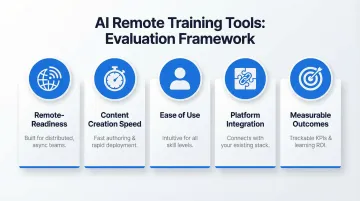
Each tool was assessed across five criteria:
- Remote-readiness, async-first design, mobile accessibility, and multilingual support
- Content creation speed, time from idea to deployable module
- Ease of use, accessible to non-designers and non-developers
- Platform integration, compatibility with existing LMS or delivery systems
- Measurable outcomes, ability to link training activity to business results
Many L&D teams choose tools based on feature count alone, without asking whether those features actually work for distributed or async learners. A platform with 50 features designed for classroom training won't help you if none of them address timezone gaps or offline access.
The most common failure mode in remote training is creating content with one tool and deploying it through another, with no visibility into whether learners completed or understood it. Tools that combine creation and delivery, or integrate tightly with platforms that do, scored higher as a result.
Beyond delivery, pricing transparency and scalability shaped the rankings too. Remote teams, especially those with partner networks, can scale quickly, and unpredictable per-user costs create real budget exposure. Tools with clear, predictable pricing models scored better.
Conclusion
The right AI tool for remote training does more than speed up content creation. It reaches a distributed workforce, drives real engagement, and produces measurable skill gains. The 5 tools covered span different needs: video creation, microlearning, full course authoring, and AI coaching.
When evaluating tools, look beyond features. Ask whether they support the full training lifecycle for remote teams:
- Can learners access content on mobile and offline?
- Does it cover creation, delivery, engagement, and measurement?
- Can you track whether training actually translates into better performance?
For organizations that need to connect training directly to partner performance, deal velocity, and revenue outcomes, Pifini.ai is built for exactly that. At $50/user/year, a fraction of what Seismic, Bigtincan, or Mindtickle charge, it links learning directly to deal outcomes across partner and sales ecosystems. Learn more or request a demo.
Frequently Asked Questions
What AI tool can I use to generate training videos?
Synthesia and HeyGen are popular AI video platforms that allow users to create professional videos from a text script using AI avatars, no cameras or editing skills required, and support multilingual output for global teams.
What is the best AI to create a training program?
The best choice depends on scope. For an all-in-one platform covering content, delivery, and coaching, Pifini.ai or Coursebox are strong options. For course outlining only, ChatGPT can speed up the process as a starting layer before moving into a dedicated LMS.
How do AI tools help train remote workers more effectively?
AI enables async, bite-sized, personalized content delivery that doesn't rely on scheduled sessions. It supports multiple languages, uses data to identify knowledge gaps, and makes training accessible regardless of location or time zone.
Can AI tools replace human instructional designers for remote training?
AI tools augment, not replace, instructional designers. AI handles repetitive tasks like content drafting, formatting, and translation. Human expertise remains essential for defining learning objectives, ensuring accuracy, and tailoring content to each audience.
What features should I look for in an AI training tool for remote teams?
Look for mobile accessibility, async-first delivery, multilingual support, built-in assessments, integration with existing LMS platforms, and, for sales or partner teams, the ability to link training completion to performance metrics.
How do you measure the effectiveness of AI-generated training content for remote workers?
Track completion rates, assessment scores, and knowledge retention over time. For sales teams, go further: measure win rates, ramp time, and certification-to-revenue correlation, metrics that platforms like Pifini.ai are built to surface.