Introduction
Sales leaders in 2026 face a new kind of operational challenge: access chaos. As sales teams expand to include internal SDRs and AEs, frontline managers, RevOps analysts, and an expanding roster of channel partners and resellers, controlling who sees which data, content, and performance insights has evolved from an IT concern into a revenue-critical problem.
With sales teams now using an average of 10 tools to close deals, each integration point is a potential security exposure or misconfigured permission waiting to happen.
Over-permissioned reps accidentally access competitor pricing or partner margin data. Under-permissioned partners disengage when they can't find what they need. The result: data leaks, inconsistent training, and bloated permissions that slow teams down.
This guide covers:
- What RBAC means specifically for sales organizations
- How to map roles to permissions across your team and partner ecosystem
- Where RBAC connects to enablement and performance outcomes
- How to implement it without creating friction
Key Takeaways
- RBAC assigns permissions based on user roles (SDR, AE, manager, partner) rather than individuals, ensuring tailored access to tools, data, and content
- Effective sales RBAC maps access to five distinct tiers, from frontline reps to CRO-level dashboards
- Without RBAC, data exposure, training inconsistency, and permission bloat slow reps down with access they never needed
- Performance improves when reps see only the training, coaching, and content relevant to their role, RBAC makes that automatic
- Roll it out by defining roles first, reviewing access quarterly, and connecting RBAC to your CRM and enablement platform
What Is RBAC and Why Do Sales Teams Need It in 2026?
Defining Role-Based Access Control for Sales Teams
Role-based access control is a permission system where access rights are tied to roles rather than individuals. Each user inherits exactly what their role requires. Instead of granting blanket "admin access" to anyone who temporarily needs elevated permissions, RBAC assigns structured roles, "Sales Manager," "Channel Partner," "SDR", each with predefined access to specific tools, dashboards, and data.
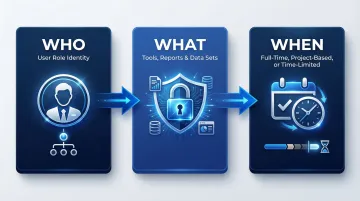
This contrasts with the all-or-nothing model many sales orgs still use: reps are granted "edit all records" during onboarding, and those permissions are never walked back. In practice, RBAC defines access around three core principles:
- Who the user is (their role in the org or partner ecosystem)
- What they can access (specific tools, reports, data sets)
- When access is active (full-time, project-based, or time-limited)
The 2026 Sales Stack Complexity
Sales technology stacks have grown dramatically. Organizations now use an average of 106 different SaaS applications, with sales teams relying on CRMs, LMS platforms, content libraries, call recording tools, partner portals, and AI coaching dashboards. Each touchpoint is a potential misconfigured permission or data exposure.
The business risk extends beyond IT security. Malicious insider attacks resulted in the highest average breach costs at $4.92 million, and 1 in 2 employees have excessive privileges. Over-permissioned reps create real exposure across multiple areas:
- Territory data visible to the wrong rep can trigger legal conflicts
- Competitor pricing intel accessed outside sanctioned roles may violate NDA terms
- Channel partner margins seen by direct reps can fracture strategic relationships
How RBAC Differs from ABAC and JIT Access
RBAC is the practical starting point for most sales organizations, but it's not the only access control model:
- Attribute-Based Access Control (ABAC): Layers in contextual attributes like location, deal stage, or time of day. Defined by NIST as access granted based on assigned attributes of the subject, object, and environment conditions
- Just-in-Time (JIT) Access: Grants temporary elevated permissions when needed, requiring approval to activate privileged roles. Only 1% of organizations have fully adopted JIT access
For most sales teams, RBAC is the right starting point, structured enough to enforce least-privilege access, flexible enough to map to how your org is actually built. ABAC and JIT become relevant as your access needs mature, particularly if you're managing large partner ecosystems with territory- or stage-specific permissions.
Mapping RBAC Roles Across a Sales Organization
The single most important implementation step is defining role tiers before configuring any tool. Most sales organizations map to five or six core roles. "Role" should reflect job function and data accountability, not just seniority. The five tiers below cover the most common structures, each with a distinct access profile and a clear boundary on what they should never see.
Frontline Reps (SDRs and AEs)
Reps need visibility into their own work, nothing more:
- Their own pipeline data and assigned accounts
- Call recordings for their conversations
- Training modules relevant to their stage
- Approved sales content and templates
Keep them away from:
- Team-wide performance data or rankings
- Partner margin information
- Platform admin settings
- Other reps' accounts or opportunities
Sales Managers and Team Leads
Managers need full visibility into their team, and approval authority where it counts:
- Full visibility into direct reports' pipelines and opportunity data
- Performance dashboards showing team metrics
- Training completion rates and skill gap flags
- Call coaching data for their team members
- Approval rights for content publishing or deal exception requests
Limit their reach to their own reporting line:
- Platform admin control
- Cross-team data (outside their reporting line)
- Partner-specific pricing or margins
Revenue Operations (RevOps) and Enablement
RevOps needs broad analytical access, read-only across functions:
- Cross-functional read access to pipeline analytics
- Training ROI data and content performance metrics
- Dashboard configuration and reporting tools
- Integration management
The write boundary is firm:
- Write access to individual rep accounts
- Deal-level manipulation
- Direct rep coaching data (unless explicitly delegated)
This is where role conflicts most often occur, RevOps needs broad visibility without operational control over individual sales activities.
VP of Sales / CRO
Executives need aggregated insights, not granular controls:
- Aggregate performance dashboards
- Win/loss trends and conversion rates
- Team-level performance comparisons
- Certification-to-revenue linkage analytics
Key distinction: CRO-level users rarely need module-level admin access. Configure them as "report viewers" with executive dashboards rather than platform admins, this reduces security exposure and eliminates the risk of accidental configuration changes.
Channel Partners and Resellers
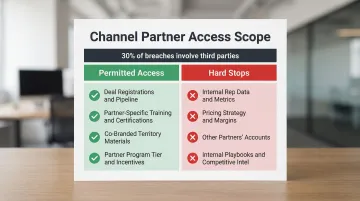
Partners are also the most commonly misconfigured tier. External partners need scoped but functional access:
Give them what they need to sell:
- Their own deal registrations and pipeline
- Partner-specific training content and certifications
- Co-branded materials for their territory
- Partner program tier status and incentive tracking
Hard stops, no exceptions:
- Internal rep data and performance metrics
- Pricing strategy and margin details
- Other partners' accounts or deal registrations
- Internal sales playbooks or competitive intelligence
The stakes are high: the percentage of breaches involving a third party doubled to 30%, and 47% of organizations experienced a data breach involving a third party in the past 12 months. The 2025 Salesloft Drift breach, which compromised OAuth tokens to systematically export data from numerous Salesforce instances, makes partner access scoping a security requirement, not an afterthought.
What Data and Tools Each Sales Role Should Access
The guiding principle: least privilege. Every role should see exactly what helps them perform, and nothing that creates risk or distraction. This applies across four categories: CRM data, content and collateral, training and coaching, and analytics.
CRM Access by Role
A clean CRM permission structure looks like this:
- SDRs: Assigned leads, sequences, and prospecting activities
- AEs: Full account and opportunity history for their book of business
- Managers: Team pipeline visibility and forecast data
- RevOps: Read access across all records for reporting and analysis
- Admins: Configuration and integration control
Most CRM overpermissioning happens during onboarding when reps receive "edit all records" access and it's never revoked. Over 80% of Salesforce access is managed at the profile level rather than through permission sets, a practice that conflicts with Salesforce's recommended access model.
Content and Collateral Access
Content access is often scoped too broadly, reps end up with materials that don't match their role, region, or stage, which creates both security exposure and decision fatigue. The right model restricts by all three:
- A partner in EMEA shouldn't see APAC-specific battlecards
- An SDR shouldn't access enterprise-tier proposal templates
- Internal reps shouldn't view partner co-branded materials
- Only certified reps should access advanced competitive positioning content
When content permissions are misconfigured, reps don't just see things they shouldn't, they spend time filtering out what's irrelevant instead of selling.
Training and Coaching Access
Managers and reps need different views into the same training data:
Manager view:
- Rep call scores and performance trends
- Training completion rates and certification status
- Skill gap flags and recommended interventions
- Coaching feedback delivery and acknowledgment tracking
Rep view:
- Their own coaching feedback and improvement areas
- Assigned learning paths and next steps
- Certification progress and requirements
- Self-assessment tools and practice modules
The ROI is measurable: effective onboarding decreases ramp-up time by 26%, and the average B2B rep takes 4.5 months to reach full productivity. Role-scoped training shortens that window by removing irrelevant modules, off-role certifications, and content designed for other teams, so reps focus on what actually applies to their pipeline stage.
Analytics and Reporting Access by Role
| Role | Metrics Visibility |
|---|---|
| Frontline Reps | Personal activity, pipeline, and quota attainment |
| Sales Managers | Team performance, conversion rates, individual rep metrics |
| RevOps | Cross-functional trends, process efficiency, tool adoption |
| VP/CRO | Aggregate revenue outcomes, win/loss trends, strategic forecasts |
| Partners | Their own performance, tier status, program incentives |
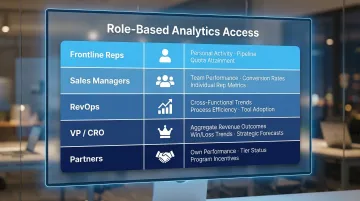
The analytics layer is where least-privilege discipline matters most. Reps who can see colleagues' pipeline data may adjust behavior based on comparison rather than their own targets, useful in a structured leaderboard context, counterproductive when it's accidental. Each role's view should reflect the decisions they're actually responsible for making.
How RBAC Connects to Sales Enablement and Performance
When reps see only the content, training, and data relevant to their role and stage, they spend less time navigating noise and more time on revenue-generating activities. RBAC functions as an enablement mechanism, structuring access so that every user's environment accelerates their performance rather than complicating it. That structure directly supports faster ramp time and more consistent results across the team.
Role-Based Enablement in Practice
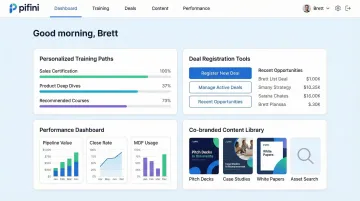
Platforms like Pifini.ai build role-based access directly into the enablement layer. Channel partners, resellers, and internal reps each receive a personalized experience:
- Training paths auto-enroll users based on their function and detected skill gaps
- AI call feedback is scoped to each user's own conversations and coaching relationship
- Performance dashboards surface only the metrics relevant to that user's role
- Partner portals isolate deal registrations and performance data while still delivering certifications, deal tools, and co-branded content
Pifini's unified platform ensures that a distributor in one region cannot see another partner's deal registrations or internal rep performance data, while still delivering the resources they need to sell effectively.
The Compliance and Audit Advantage
Role-based access creates a clean, defensible log of who accessed what and when, critical for SOC 2, GDPR, and enterprise procurement reviews. Enterprise buyers increasingly require detailed access audit trails during security assessments, and RBAC satisfies that requirement without any manual tracking overhead. The audit log is a byproduct of good access design, not an extra step.
Key compliance benefits RBAC delivers automatically:
- Timestamped access records for every user, role, and resource
- Clear separation of partner and internal rep data for data residency requirements
- Defensible documentation for SOC 2 Type II and GDPR assessments
Implementing RBAC for Your Sales Team: A Practical Framework
Step One: Audit Before You Configure
Before touching any tool settings, map all current users to intended role tiers. Identify:
- Over-permissioned accounts (especially former admins who changed roles)
- Unused logins that retain elevated access
- Shared credentials that bypass individual accountability
The scale of the problem: 91% of organizations report that at least half of their privileged access is "always-on," providing unrestricted, persistent access to sensitive systems.
Step Two: Define Roles by Function, Not Title
Job titles change frequently, but functional responsibilities (prospecting, managing, reporting, partnering) remain more stable. Build your RBAC model around what each user needs to do, not what their business card says.
Example: A "Senior AE" and a "Strategic Account Executive" may have identical role permissions despite different titles, both manage enterprise accounts, access the same content library, and require similar CRM visibility.
Step Three: Schedule Quarterly Access Reviews
RBAC breaks down through "role drift", when someone changes territories, gets promoted, or takes on temporary admin tasks and never gets their permissions updated. Build quarterly reviews into your sales ops calendar.
Automated deprovision triggers cut the manual maintenance load significantly, and the need is real. With 25% annual sales rep turnover expected and 90% of companies reporting former employees who accessed SaaS apps after leaving, manual offboarding alone won't keep permissions clean.
Common RBAC Pitfalls in Sales Teams (and How to Avoid Them)
Pitfall 1: Treating RBAC as a One-Time Setup
In high-turnover sales environments, permissions accumulate quietly. Onboarding moves fast and offboarding is often incomplete, which means role drift sets in before anyone notices.
A rep who temporarily helped with admin tasks still holds those elevated permissions months later. An AE promoted to manager keeps individual contributor access to deal data outside their team.
Solution: Automate role change triggers tied to your HR system and CRM. When someone's title or reporting line changes, their permissions should update automatically, not wait for the next manual audit.
Pitfall 2: Over-Restricting Partners and Wondering Why Adoption Is Low
Channel partners who can't find the content, training, or deal tools they need simply disengage. RBAC for external partners needs to be permissive enough to be useful while remaining scoped to their lane.
Portal adoption rates drop by 40% when partners must navigate multiple disconnected tools, and 68% of technology advisors rarely or never use vendor pre-sale tools due to portal fatigue. Overly restrictive access is a direct contributor to both numbers.
Solution: Design partner RBAC with usability as a priority. Give partners a single access point with all the resources they need, certifications, deal registration, co-branded content, without exposing internal data.
Pitfall 3: Confusing Role-Based Access with Territory-Based Access
These two access layers serve different purposes and are configured separately:
- RBAC defines what type of data a user can access based on their function
- Territory-based access filters which specific records, accounts, leads, opportunities, they can see
A West region rep and an East region rep may have identical role permissions (same CRM and content access), but their data visibility is filtered entirely by territory logic.
Solution: Configure RBAC first to establish functional permissions, then layer territory or account-based filters on top. Conflating the two creates tangled permission structures and auditing headaches.
Frequently Asked Questions
What is role-based access control in sales?
RBAC is a permission system where access to tools, data, and content is tied to a user's function in the sales organization, ensuring reps, managers, and partners each see what's relevant to their role rather than granting blanket access.
What are the most common RBAC roles for a sales team?
Most sales teams use five to six core tiers: frontline reps (SDR/AE), sales managers/team leads, RevOps/enablement, VP/CRO, and channel partners, each with distinct access to CRM data, content, training, and analytics.
How does RBAC differ from territory-based access control?
RBAC defines what type of data a user can access based on their function (manager vs. rep), while territory-based access filters which specific records they can see (West accounts vs. East accounts). The two systems work together but are configured separately.
How should channel partners be handled in a sales team's RBAC setup?
Partners need a distinct external role with access to partner-specific content, training, certifications, and their own deal registrations.Partners need a distinct external role with access to partner-specific content, training, certifications, and their own deal registrations. They must be isolated from internal rep data, other partners' accounts, and pricing strategy to prevent competitive exposure.
How often should sales teams review and update RBAC permissions?
Conduct quarterly access reviews at minimum, with automated triggers for role changes like promotions, territory shifts, or offboarding. High-turnover sales environments are especially vulnerable to permission drift and orphaned accounts.
Can RBAC be integrated with CRM and sales enablement platforms?
Yes. Most modern CRMs, LMS, and enablement platforms support RBAC natively or via identity provider sync (SSO/SCIM), pushing role assignments automatically across connected tools when a user's role changes in your directory.